What's new
 Version 2.2.1 - August 2026
Issues addressed in this release
| DevOps Work Item | 29553 | ||||
| Category | Signing in | ||||
| Summary | Users with an email address outside a customer's domain are unable to sign into Asta Siteprogress when federated authentication is in use. | ||||
| Description | A customer whose users sign into Asta Siteprogress using their Microsoft Entra ID credentials ('federated authentication') reported that since the release of Asta Siteprogress 2.2.0, any users with email addresses outside the customer's domain were unable to sign in to the Asta Siteprogress mobile app by entering their Asta Siteprogress user name and password. | ||||
| Resolution |
If customers use federated authentication, so that most of their users sign into Asta Siteprogress using their Microsoft Entra ID credentials, users with email addresses outside the customer's domain that have been configured as users in Asta Siteprogress configuration are now able to sign into the Asta Siteprogress mobile app using an Asta Siteprogress user name and password.
Note that if federated authentication is in use, users with email addresses that are within the customer's domain are not allowed to sign into Asta Siteprogress using an Asta Siteprogress user name and password; they must sign in using their Microsoft Entra ID credentials.
|
||||
Version 2.2.0 - August 2026
New look and feel
The Asta Siteprogress app has been given a completely new look and feel. As well as making the app more attractive, the improvements have made it more intuitive and easier to use.
All of the app's screens have been redesigned. While you should find it easy to find your way around the redesigned app, it is worth noting the following new icons and what they mean.
Icons appear to the left of each task to indicate their status:
| New icon | Previous icon | Description |
|---|---|---|

|

|
The task is due. |

|

|
The task is not yet due. |

|

|
The task is overdue. |
The colours of these icons may vary in your version of Asta Siteprogress, as they can be configured by an Administrator.
If you use Asta Siteprogress to collect field evidence, icons appear to the right of each downloaded project on the Projects screen to indicate the field evidence status of the project's tasks.
For Mobile users, the icons appear as follows:
| New icon | Previous icon | Description |
|---|---|---|

|

|
Field evidence needs to be collected for one or more of the project's tasks. This may be because it has not yet been collected, or because it has been submitted but rejected. |

|

|
All of the required field evidence has been collected for the project's tasks. It may or may not have been reviewed; if it has been reviewed, all items of field evidence have been approved. |
For Administrator users, the icons appear as follows:
| New icon | Previous icon | Description |
|---|---|---|

|

|
Field evidence has been collected for one or more of the project's tasks and it requires review. |
|
|
|
All of the required field evidence has been collected and reviewed for the project's tasks. Some may have been approved and some may have been rejected. |
Similar icons appear against each task on the Project screen, to indicate the field evidence status of each individual task.
For Mobile users, the icons appear as follows:
| New icon | Previous icon | Description |
|---|---|---|
|
|
|
One or more items of field evidence needs to be collected for the task. This may be because it has not yet been collected, or because it has been submitted but rejected. |
|
|
|
All of the required field evidence has been collected for the task. |
For Administrator users, the icons appear as follows:
| New icon | Previous icon | Description |
|---|---|---|
|
|
|
One or more items of field evidence that has been collected for the task has been rejected. |
|
|
|
One or more items of field evidence that has been collected for the task has been submitted and requires review. |
|
|
|
All of the required field evidence that has been collected for the task has been approved. |
Version 2.1.0 - January 2026
Collect field evidence to prove that tasks have been completed
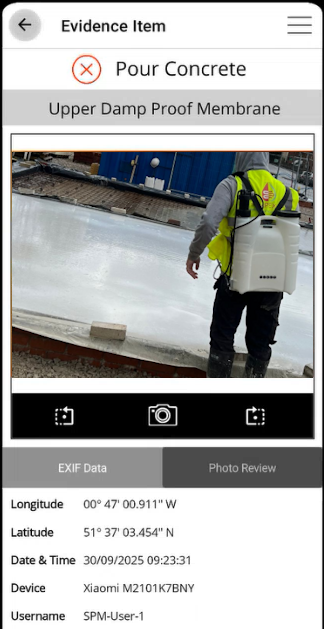
You can use Asta Siteprogress to collect field evidence - photographic evidence, stamped automatically with information on when and where the photograph was taken, and by whom - to prove that individual tasks have actually taken place on a plot. Asta Siteprogress's field evidence feature can be useful to ensure that you comply with building regulations - for example, Part L of the UK Building Regulations, which covers the conservation of fuel and power and which insists on evidence of compliance.
Two types of user are involved in the collection and review of field evidence:
- Mobile users use Asta Siteprogress to collect field evidence to prove that tasks have been completed. Collecting field evidence involves taking a photograph for each evidence item that is associated with a task; each task can have more than one field evidence item associated with it. Asta Siteprogress automatically saves data relating to where and when the photographs were taken, and who they were taken by.
- Administrator users use Asta Siteprogress to review field evidence that has been submitted by Mobile users, approving it if it is satisfactory, or rejecting it if it is not.
To enable the collection and review of field evidence, a new Field Evidence tab has been added to the Task Progress screen. This tab displays the evidence items that must be collected for each task:
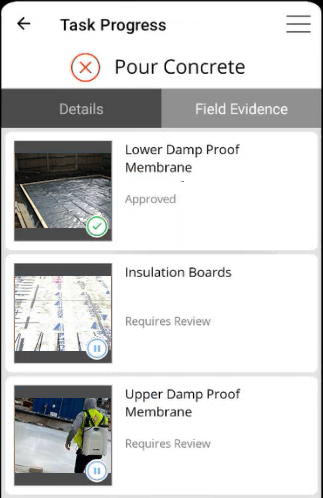
Tapping an evidence item displays the new Evidence Item screen, which is used by Mobile users to collect field evidence, and by Administrator users to review field evidence:
Mobile users can identify the projects and tasks for which field evidence must be collected, as a  icon appears against them.
Administrator users can identify the projects and tasks for which field evidence must be reviewed, as a  icon appears against them.
More information on collecting and reviewing field evidence for tasks