Collecting and reviewing field evidence for tasks
Two different types of Asta Siteprogress user use the Field Evidence tab of the Task Progress screen:
- Mobile users use this tab to collect field evidence to prove that tasks have been completed. Collecting field evidence involves taking a photograph for each evidence item that is associated with a task; each task can have more than one field evidence item associated with it. Asta Siteprogress automatically saves data relating to where and when the photographs were taken, and who they were taken by.
- Administrator users use this tab to review field evidence that has been submitted by Mobile users, approving it if it is satisfactory, or rejecting it if it is not.
 Mobile users - collecting field evidence to prove that a task has been completed
Collecting new field evidence
The Field Evidence tab displays details of the evidence items that are required for the task you tapped on the Project screen. If field evidence has not yet been collected for an evidence item, no photograph appears against it and 'Photo Required' appears to the right of the evidence item.
To collect field evidence for an evidence item:
- Tap an evidence item. The Evidence Item screen appears, with the evidence item name displayed at the top of the screen. You use this screen to take a photograph for the evidence item.
If Asta Siteprogress is not currently permitted to access your mobile device's location, you are prompted to allow the app access before the Evidence Item screen appears. You must allow Asta Siteprogress access to your location to collect field evidence. - Tap
 to access your mobile device's camera.
If Asta Siteprogress is not currently permitted to take pictures and record video, you are prompted to allow the app to do this. You must allow Asta Siteprogress take pictures and record video to collect field evidence. - Take a photograph that can be used to prove that the particular evidence item has been completed, then click OK. Make sure that the photograph is as clear as possible: unclear photographs may be rejected, meaning that you will need to retake them. You return to the Evidence Item screen, which displays the photograph, along with information on where and when the photograph was taken, and who it was taken by.
To check the quality of the photograph, use two fingers to zoom in and out: pinch out with two fingers to zoom in, and pinch in with two fingers to zoom out.
If you are not happy with the photograph, you can tap to retake it; tap  or
or  to rotate the photograph if required; or tap
  to edit it. If you decide that the photograph is unsuitable, tap
  to delete it.
 - Tap
 to return to the Field Evidence tab of the Task Progress screen, where the photograph you have taken appears against the evidence item. A
  icon against the item indicates that the item has not yet been reviewed.
 - Take any further photographs as required to prove that the task's evidence items have been completed.
All field evidence you have collected is submitted when you submit your progress data, and can now be reviewed by an Administrator.
Retaking field evidence that has been rejected
Once you have submitted field evidence, you should swipe down the Projects screen intermittently to refresh the screen and discover whether any of your field evidence has been rejected. If an Administrator user rejects one or more of the evidence items you have submitted, a  icon appears against the relevant project on the Projects screen, and against the relevant task on the Project screen, to indicate that you need to retake one or more items of field evidence for the task.
If you need to retake one or more items of field evidence, access the Evidence Item screen as described above - the reason for the rejection is displayed on this screen - retake the photograph and resubmit the field evidence.
Administrator users - reviewing field evidence that has been submitted by Mobile users
The Field Evidence tab displays a list of the field evidence items that have been collected for the task you tapped on the Project screen. A icon against an item indicates that the item has not yet been reviewed.
To review field evidence that has been submitted by Mobile users:
- Tap an evidence item. The Evidence Item screen appears, with the task name and evidence item name displayed at the top of the screen. You use this screen to review the evidence item.
- Tap a field evidence item that you want to review. The Evidence Item screen appears, displaying the photograph was taken as evidence for this item, along with information on where and when the photograph was taken, and who it was taken by.
- Tap the Photo Review tab in the lower section of the screen. For evidence items that are yet to be reviewed, 'Requires Review' appears in the Status field.
- You can now approve or reject the evidence item:
- To approve an evidence item, tap the Status field and select 'Approved'. The item is approved and you return to the Field Evidence tab of the Task Progress screen, where a
 icon now appears against the item to indicate that it has been approved.
 - To reject an evidence item, tap the Status field and select 'Rejected', then enter or select a reason for the rejection reason in the Rejection Reason field. For example, you may want to reject an item because the photograph is too blurred. The item is rejected and you return to the Field Evidence tab of the Task Progress screen, where a
 icon now appears against the item to indicate that it has been rejected.
If you enter a new rejection reason in the Rejection Reason field, that reason then becomes available for you to select in the field the next time you reject an item.
- To approve an evidence item, tap the Status field and select 'Approved'. The item is approved and you return to the Field Evidence tab of the Task Progress screen, where a
- Repeat steps 2 to 4 to approve or reject the remaining field evidence items that have yet to be reviewed.
- Tap to return to the list of tasks in the project.
- Follow the above steps to approve or reject field evidence items for the remaining tasks.
- Once you have finished reviewing field evidence for a project's tasks, you can submit your approvals and rejections. To do this, return to the Project screen and tap Submit project changes.
If you reject one or more evidence items, the Mobile user will see that they have been rejected when they next swipe down to refresh the Projects screen. They can then re-take the photographs for the rejected items and resubmit the evidence items for approval again.
All field evidence items that have been submitted by a Mobile user for a project must have been approved before the corresponding job can be imported into Asta Powerproject.
Overview of the progress reporting process when field evidence is collected
The following illustration shows the way in which Asta Siteprogress is used to update project information with remotely-recorded progress when field evidence is collected. Steps that are carried out by Administrators are shown in dark grey; steps carried out by Mobile users are shown in orange. More information on each stage of the process is given beneath the illustration:
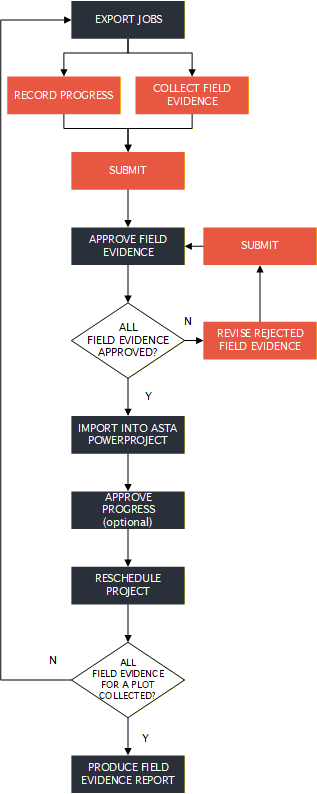
Export jobs
Asta Siteprogress Administrators use the Site Progress tab of the Backstage view to export project information from your Asta Powerproject projects. Typically, the export is done once a week, usually at the start of each week - Monday afternoon would be a good time to do this. Project information - information relating to those tasks that should be in progress or complete during or just after the current working period - is exported to the Cloud, from where it can be updated by each Mobile user using a mobile device.
Information on the tasks for which field evidence must be collected, and on the individual evidence items that must be collected, is exported when you export information from your Asta Powerproject project(s) so that it can be updated using Asta Siteprogress.
Record progress
When a Mobile user accesses Asta Siteprogress at the start of a working period - usually a week or fortnight - information relating to the tasks on which they are due to work during the working period are downloaded. Mobile users select the project that they want to update and browse through the project hierarchy to locate the chart or summary group that represents the site that they want to update. They can then use Asta Siteprogress to update individual tasks and to tick off the build stages that have been completed for each plot. They can also associate photographs and notes with particular tasks or build stages.
Collect field evidence
If the names of any of the tasks that have been exported match the names of tasks in your field evidence template, Mobile users can collect field evidence to prove that those tasks have been completed. Collecting field evidence involves taking a photograph for each evidence item that is associated with a task; each task can have more than one field evidence item associated with it. Asta Siteprogress automatically saves data relating to where and when the photographs were taken, and who they were taken by.
Submit
Once a Mobile user has finished recording progress - usually at the end of the week - they submit the information that they have recorded using Asta Siteprogress.
If the Mobile user has collected any field evidence, the field evidence is submitted at the same as their progress information. Any field evidence photographs that they have taken are uploaded to the Cloud at this point.
Approve field evidence
Once a Mobile user has submitted one or more field evidence items, Administrator users receive an email to inform them that field evidence has been submitted. They then sign into Asta Siteprogress to review the field evidence that has been submitted. Administrators can approve or reject each individual item of field evidence. If they reject an item, they must record a reason for the rejection.
Revise rejected field evidence
If any field evidence items are rejected - for example, because a photograph is not sufficiently clear - Mobile users must revise the rejected items, usually by taking another photograph. They can then resubmit the rejected items, which go through the approval process once more.
Import into Asta Powerproject
Once all the field evidence relating to a job has been approved, an Administrator user can use the Site Progress tab of the Backstage view to import progress back into your Asta Powerproject projects. As with the export, the import is typically done once a week. If you export every Monday afternoon, Monday morning would be a good time to carry out the import.
Field evidence is not imported into Asta Powerproject; the field evidence photographs remain in the Cloud.
Approve progress (optional)
Approving Asta Siteprogress progress information is an optional step - approval takes place only if the Imported progress requires approval check box on the Import tab of the Site Progress Settings dialog is selected. If Asta Siteprogress is configured to require approval, Administrator users accept or reject the progress that has been recorded by Mobile users. Any progress that is rejected is not imported into the appropriate Asta Powerproject project.
Reschedule project
Once updated project information has been imported into the Asta Powerproject projects, the projects can be rescheduled in order to move uncompleted tasks beyond the report date of the last-used progress period. Once the projects have been rescheduled, the process can be started again, beginning with the export.
Produce field evidence report
Once an Administrator user has approved all of the field evidence that is required for a plot, they can produce a field evidence report on the plot. Field evidence reports can be produced for a plot at any time before all of the plot's field evidence has been collected, but it makes sense to wait until all of the plot's field evidence has been collected before producing a report.
Field evidence reports, which are produced in PDF format, include a front page that displays general information about the project, your organisation and the selected plot, which you specify when you produce the report. This is followed by information about the tasks that have been carried out on the plot, and the individual field evidence items that have been collected and approved for each task. The tasks and field evidence items appear in the report in the order in which they appear in the field evidence template.