Restricting access to data sources and projects
You restrict access to projects and data sources by creating users. There are two levels of username and password in an Asta Enterprise system:
- Server-level – you can grant or withhold access to data sources on the server to this level of user. You create server-level users in Server Admin.
- Project-level – you can grant or withhold access to individual projects (within groups or programmes of projects) to this level of user. You can also specify detailed access rights within projects for project-level users. You create project-level users in Asta Powerproject; you specify their access rights by creating security groups, each with a different level of access, and assigning each user to the security group that has appropriate access rights for that user.
The way in which you use server-level and project-level users depends on the way in which you organise your projects and the way in which you want to restrict access to them. The following examples show ways in which you could organise your projects:
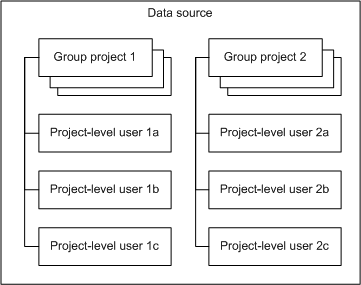
 Example 1 - all projects in one data source
If all your projects are located in one data source, you do not need to create server-level users; simply create project-level users for each project. Note that in this sense, a ‘project’ can also be a group project, or programme of projects. When you create a new project, you are logged into the server and the project as the administrator, using the ‘Admin’ username. You can then create subordinate users within the project (or group project), giving them usernames and passwords and assigning them to security groups that give them appropriate access rights. To prevent users from accessing a project as the ‘Admin’ user, you can apply a unique password to that user within the project.
With all projects in one data source and no server-level users created, people do not have to log into the server; they only have to log into each project that they open, using the username and password they have been assigned within the project.
Example 2 - different projects in separate data sources
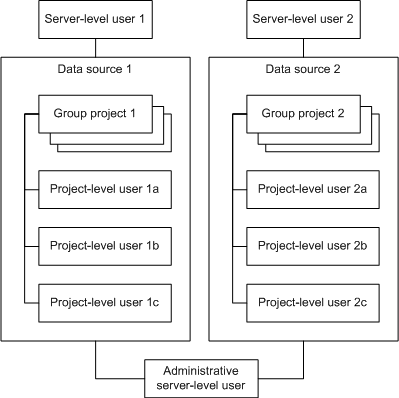
You may want to store different projects in separate data sources. For example you may want to store your live projects in one data source and your trial projects in another. In this scenario, you could create one server-level user for each data source and a project-level user for each person that is to use the projects in each data source. You could also create a server-level user that has administrative access to all data sources.
The person responsible for creating new projects could log into the server using the appropriate server-level username. They could then create projects within a data source, then create subordinate users within each project (or group project), giving them usernames and passwords and assigning them to security groups that give them appropriate access rights.
With different projects in separate data sources, people log into the server using the appropriate server-level username and password, and into each project that they open using the project-level username and password they have been assigned.
Note that you cannot share a common resource pool between projects on different data sources, and it is impossible to view projects across different data sources as a whole.
To restrict access to data sources in Server Admin:
To restrict access to projects in Asta Powerproject:
- Create project-level users.
- Create as many security groups as you need to specify the different levels of access that you want to give to the various project-level users.
- Assign each project-level user to the appropriate security group to specify the areas of each project to which each user has access, and the level of access they have.
Refer to Asta Powerproject Help for full details of how to create project-level users and specify their access rights.
The Asta Enterprise system offers support for the Active Directory® service. Active Directory catalogues information about all the objects on a network, including people, computers, and printers, and distributes that information throughout the network. Security is integrated with Active Directory through login authentication and access control. If you use Active Directory to manage the users on your network, you can configure the Asta Enterprise system to allow users to log into servers and projects automatically, using the security and access control provided by Active Directory. Configuring the Asta Enterprise system to use Active Directory means that users do not have to enter user names and passwords when they log into their projects.