Moving bars and tasks horizontally
Move a bar or task horizontally to change its start and finish dates either by entering new start and finish dates in the spreadsheet or by dragging tasks along their bar.
To move a bar or task by dragging in the bar chart:
- Position the mouse pointer over the centre of the task that you want to move. To move a whole bar, select the bar by ALT-clicking any task on the bar then position the mouse pointer over the centre of any task on that bar.
- When the
 cursor appears, drag the pointer left or right along the bar. The task follows the mouse pointer as you drag. If a whole bar is selected, all the tasks move relative to the task that you drag.
 - Release the mouse button when the task is at the position you want. If you hold down CTRL when you release the mouse button, the bar or task is copied instead of moved. When you hold down CTRL, notice that a + is added to the cursor, indicating that the selection will be copied instead of moved. A copied bar is inserted above the bar on which you dropped it.
CTRL-dragging tasks is a useful way of copying multiple tasks to duplicate them on their bars. For example, if you have three linked tasks on three different bars and you want to duplicate them, select all three tasks, then CTRL-drag them along their bars. As you drag, an outline of the tasks indicates where they will be positioned when you release the drag.
If you move a task to a position where it overlaps other tasks, when you release the task the other tasks are moved aside or 'shunted along' to accommodate the task that has been moved. The only exceptions to this are summary tasks
To move a task along its bar rearranging the order of tasks, drag the task up and over the other tasks on the bar then release the task at the position you want. The task is inserted on the bar at its new position while the other tasks on the bar remain at their original positions:
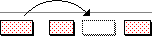
If a group of tasks is selected when you move a task up and over other tasks on the same bar, the other selected tasks may also 'leapfrog' over tasks on their own bars.
 Other ways of moving a bar or task horizontally
- Select the task and change its start or finish date in the Object Edit toolbar.
- Select a task and use the
 and
and  buttons in the Object Edit toolbar. Each click moves the task left or right by one snapping time unit.
 - Drag the bar or task using the right mouse button. When you release the drag, a popup menu appears for you to choose whether to move or copy the bar or task to its new position, or whether to cancel the operation.
Moving bars and tasks vertically