Calculating the cascade activity number of tasks when rescheduling
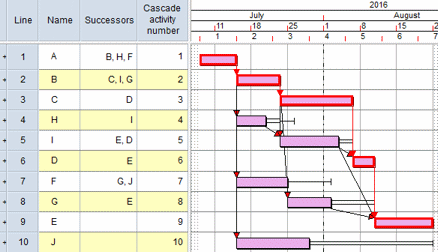
You can calculate the cascade activity number of tasks when rescheduling. Calculating the cascade activity number of tasks enables you to use cascade planning, in which each task is assigned a unique number - the cascade activity number - and you can sort tasks according to their cascade activity number. When you do this, all links point downwards and the various paths through the project are distinguished clearly, with the critical path appearing first.
To calculate the cascade activity number of tasks when rescheduling, select the Cascade activity numbers check box, on either the Reschedule tab of the Options dialog (used to set default reschedule options) or the Reschedule dialog (used to set options at the time of a reschedule).
If you choose to calculate cascade activity numbers, it will take longer to reschedule a project; for this reason, cascade activity numbers are not calculated whenever Risk Analysis or the resource leveller reschedules the project.
How cascade activity numbers are calculated
Cascade activity numbers are calculated according to the following rules:
- The first task is assigned a cascade activity number of 1.
- Subsequent tasks are numbered in order - 2, 3, 4, etc - as far as the first "burst activity" (a task at which a path divides). One path from this burst activity is numbered until a "merge activity" (a task at which the path joins another path) is reached.
- When a merge activity is reached, it is not numbered immediately, but the numbered path is retraced to the last burst activity (ie to the one with the highest cascade activity number). If another path from this burst activity leads to the same merge activity, this path is then numbered. If the burst activity has no other paths leading to the merge activity, the numbered path is retraced to the next highest burst activity. This process is repeated until all paths leading to the merge activity are numbered.
- The merge activity is then numbered, and cascade activity numbering continues.
Cascade activity numbers are calculated for all types of task; completed tasks have no effective logic and are therefore considered to have a cascade activity number of zero.
In the example below, the cascade activity numbers have been calculated and the chart has been sorted by cascade activity number. All of the links run from top to bottom and the paths through the network are distinguished clearly, with the critical path appearing first: