Specifying which baseline is the "current baseline"
Once you have created one or more baselines, you should specify that one of the them - usually the most recent or the most relevant - is the "current baseline". Only one baseline can be set as the current baseline at any one time. You can configure many fields within Asta Powerproject to display information from the current baseline, rather than from a specific baseline. If you do this - and if you make sure that when a different baseline becomes the most recent or relevant, you identify that as the current baseline - you can be sure that you are always displaying information from the most recent or relevant baseline, without having to reconfigure all of the fields when a different baseline becomes the most recent or relevant.
To specify that a baseline is the current baseline, either:
- Select the baseline on the Baseline/What If Manager dialog and click Set As Current.
- Select the baseline in the Current baseline control, in the Show group on the View tab of the Ribbon:
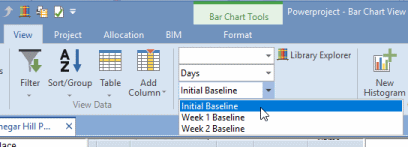
The baselines are identified in the Current baseline control by either their title or their file name, depending on the way in which you have chosen to identify baselines in the Identify non-embedded baselines by field, on the View tab of the Options dialog. The title or file name of the current baseline is always displayed in this control, making it easy to identify which baseline is current. Embedded baselines are saved as part of the corresponding project file, so they do not have a file name; baselines in Asta Enterprise projects do not have a file name either. For this reason, embedded baselines and Asta Enterprise baselines are always identified by their titles.
Associating different baselines with individual projects
Displaying baseline information in the bar chart